Security
Which pages each role can reach, and how to change it.
Everyone in the workspace has one of four roles, given when they are invited on Team. The role is a starting point, not a fixed set of permissions: what it can reach is a grid an admin edits on Security.
The four roles, and what they start with
- Admin — everything, billing included.
- Office — the desk and what runs it: Cockpit, Inbox, Appointments, Contacts, Team, Services, Reminders, Feedback and the Loyalty card. Not the Settings pages, and not publishing.
- Social — everything that speaks to clients without touching the desk: Social, Blog, Landing page, Campaigns, the whole Retention section, and the Assistant pages behind them. No inbox, no appointments, no client records. This is the role for an agency or a freelance community manager — you can hand over your Instagram without handing over your appointment book. No Cockpit either: it reports on the desk, which is not this role's business.
- Practitioner — their own Calendar, plus Appointments and Contacts. Calendar alone meant looking up a phone number or moving a booking went through whoever was on the desk, which is not what a practitioner's day allows. Still nothing that runs the business.
The grid
Security is every page down the side, grouped exactly as the sidebar groups them, and the roles across the top. Tick a box and that role gains the page; untick it and the page leaves their sidebar, its address closes — someone typing the URL is sent back to their own home page — and the actions on it stop answering. The nav and the guards read the same row, so they cannot disagree: there is no page left reachable behind a hidden menu, and no button that stays clickable on a page you have closed.
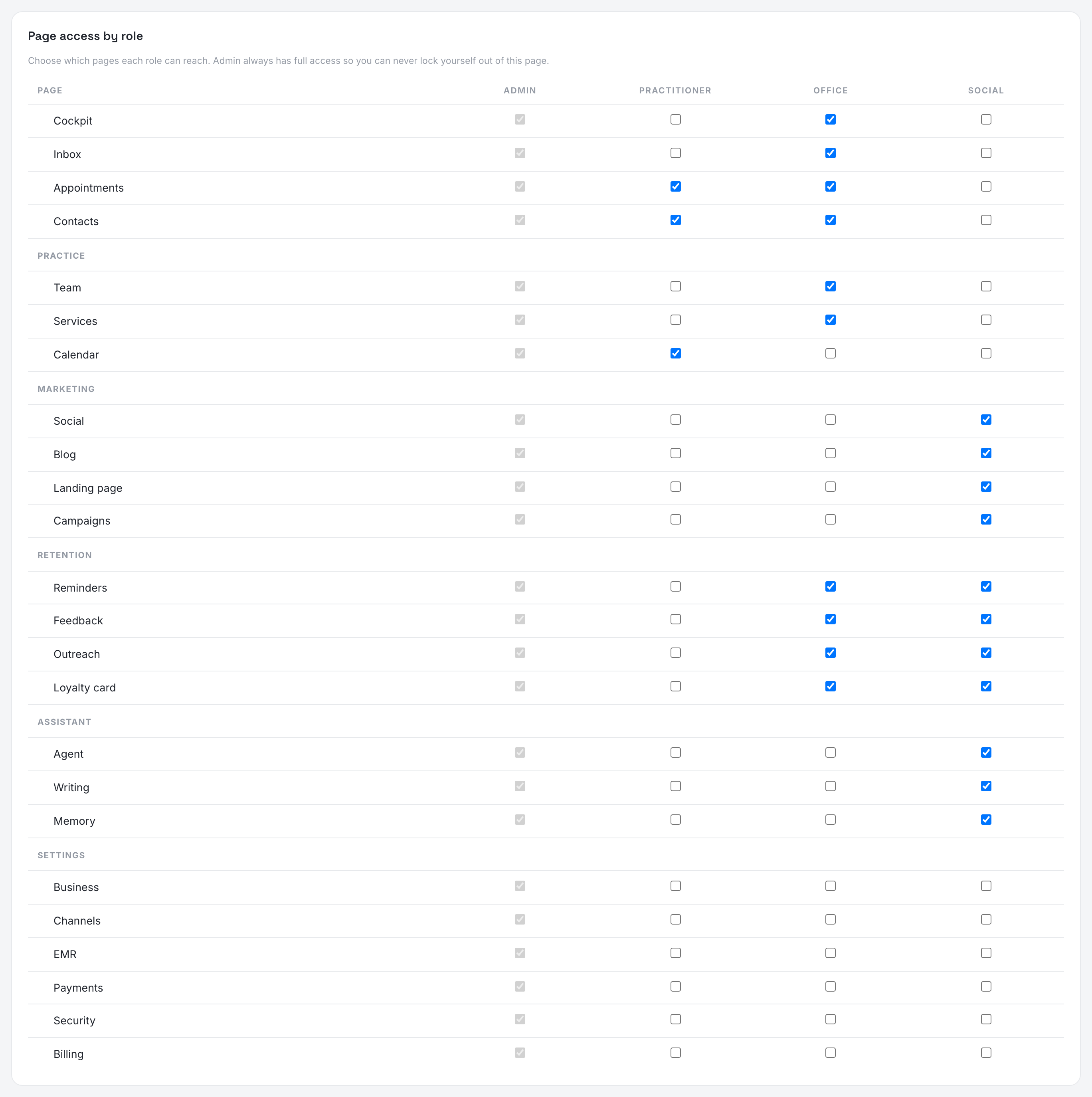
Changes apply immediately, one checkbox at a time. There is no save button and nothing to publish.
The Admincolumn is shown ticked and cannot be edited — otherwise an admin could remove their own access to the page that fixes it.
What the grid does not move
A handful of things stay with admins whatever the grid says, because they change the workspace rather than run it: inviting people and changing their roles, the Business profile, everything on Billing, connecting channels, the widget and the advertising accounts. Giving a role one of those pages lets them read it, not sign for it.
The workspace always keeps at least one admin: the last one can be neither removed nor demoted.
Where each role lands
Everyone opens on the first page they can reach, which is why the order matters: an admin or an office member on the Cockpit, a practitioner on their own calendar rather than on the whole workspace's book, a social member on Social.
Your own account
Your password and your details are personal, not workspace — they live under your portrait, top right, on Account, and stay there whatever your role. If you belong to more than one workspace, the box at the top of the sidebar becomes a switcher.