EMR
Keep bookings and patient files in step with the system your practice already runs on.
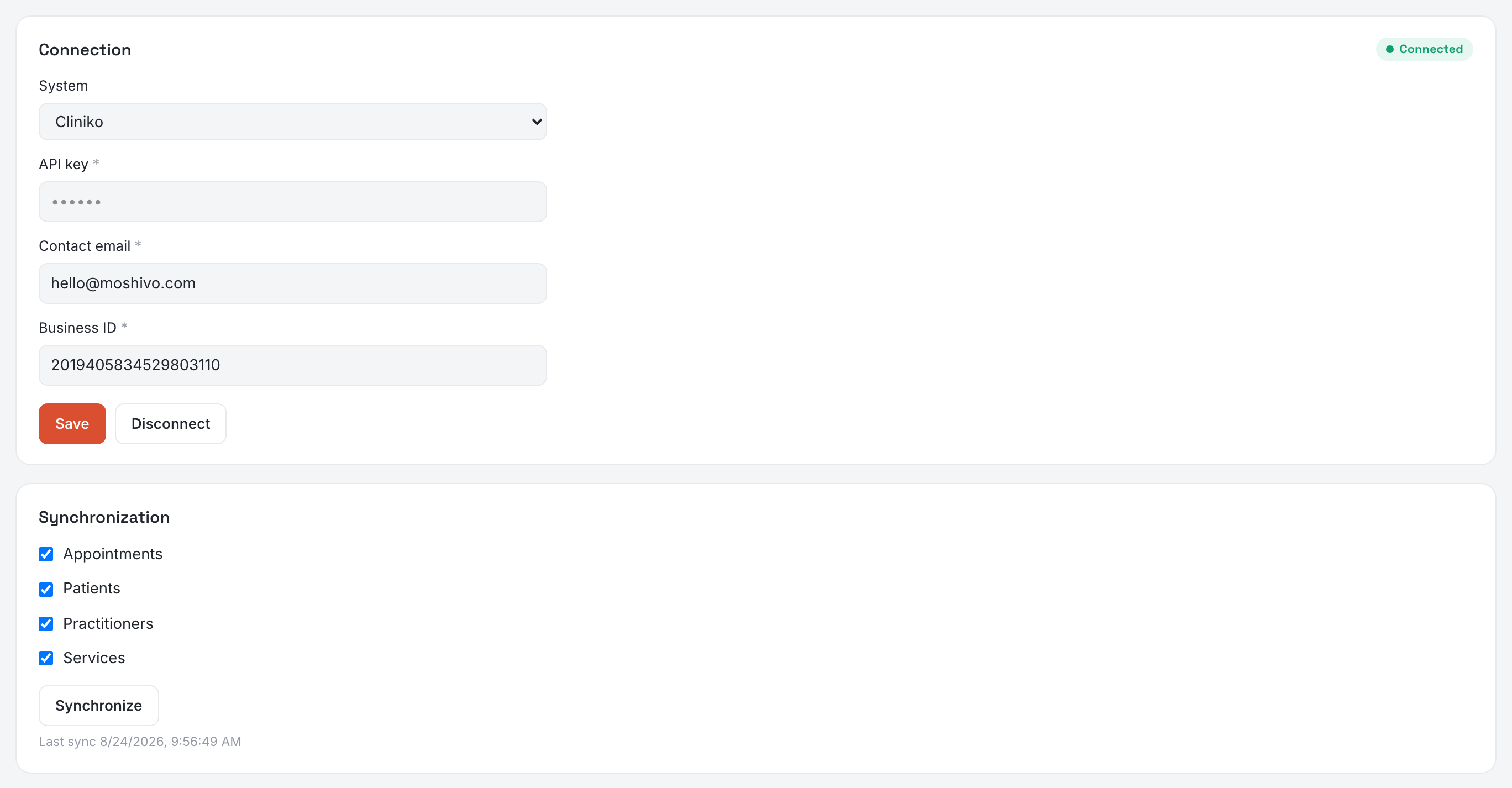
Moshivo does not replace your medical record system. We own the conversation and the booking; your EMR owns the patient file. Settings → EMR is where the two are joined, and where you decide exactly what may travel between them. Two panels: Connection, then Synchronization — what it is allowed to do.
Connecting
Pick your System and the form changes with it, because the systems do not ask for the same things:
- Cliniko — API key, contact email and business ID. The key carries its region in its own tail (…-au2), so there is nothing regional to fill in.
- Zenoti — API key and centre ID.
- Pabau — API key.
- Clinicea — API key, and an API URL only if yours is not the standard one. Their API is a paid add-on on their side.
Then press Save. Saving is connecting: the credentials are stored and used immediately against your EMR, and the chip in the panel header answers — Connected, or Needs attention with the reason underneath. There is no separate test to press, because a connection that had been saved but never tested was one discovered at the first real booking, in front of a client. A key that fails stays saved: permissions granted tomorrow should not mean retyping it today.
Keys are write-only. Once stored they are never sent back to your browser, so the field shows dots and an empty field means keep what is there.
Choosing what synchronizes
Four switches, all off until you turn them on. Connecting an EMR and writing into it are two different decisions, and only the second one leaves permanent traces in a medical register. Before the connection is saved the switches travel with it; afterwards each tick saves on its own.
- Appointments — both ways, and one switch rather than two because the half-states are traps. Confirmed bookings are written into your EMR with their reschedules and cancellations, and what your team changes over there on those same appointments comes back — the time, a cancellation, a no-show. It only ever touches appointments we sent, so your diary is never imported.
- Patients — their register is pulled into Contacts, which is what makes a new desk useful on day one. We match on phone, then email, before creating anything, and an existing contact is never overwritten. In the other direction a file is created only when somebody books, not for everyone who sends a message. It is not symmetrical: a phone number corrected in your EMR does not come back to us.
- Practitioners and Services — matched by name. What matches is linked, what matches nothing is left for a human: an approximate match on a practitioner is a client booked with the wrong doctor.
A switch your EMR cannot support is greyed out and marked not supported rather than pretending. Pabau and Clinicea cannot be written to, so their Appointments switch stays off whatever you do.
How often it runs
Every five minutes, plus immediately for each booking as it is made — the timer only catches up on what an outage left behind. Synchronize runs the same job on demand, and the first run is the one that matters: it is what pulls the existing register across. It reports what it moved, or says it is already up to date rather than showing you three zeroes. A large practice takes several runs; the button says so and picks up where it stopped.
What never travels
Clinical notes, prescriptions, images, invoices and insurance claims stay in your EMR. We do not read them and we do not write them.
Worth knowing
- Cliniko cannot search patients by phone number. Their API filters on email and name only, so a client who has only ever given a number cannot be found in your register and a new file is created. Nothing is lost, but there may be two files for one person to merge.
- A booking whose practitioner is not linked does not travel. It fails loudly rather than letting us pick a practitioner in your system — turn on Practitioners and press Synchronize before expecting appointments to arrive.
- If your EMR is unreachable, nothing breaks. The booking is made here first and queued; it reaches your EMR when it answers again.
- Disconnecting keeps the links. Credentials go, the matches between their records and ours stay — reconnecting the same EMR must not resolve every patient again and give the clinic a second file for everyone. It asks twice before doing it.