Contacts
Everyone who has ever written to you, and what happened next.
Contacts is the client base. Nobody is entered by hand unless you want them to be: the first message on any channel, a booking from the widget and an inquiry from a form all create the person here, already linked to what they did.
The base belongs to the business rather than to the location that met them first, so a group sees one list across its desks.
The list
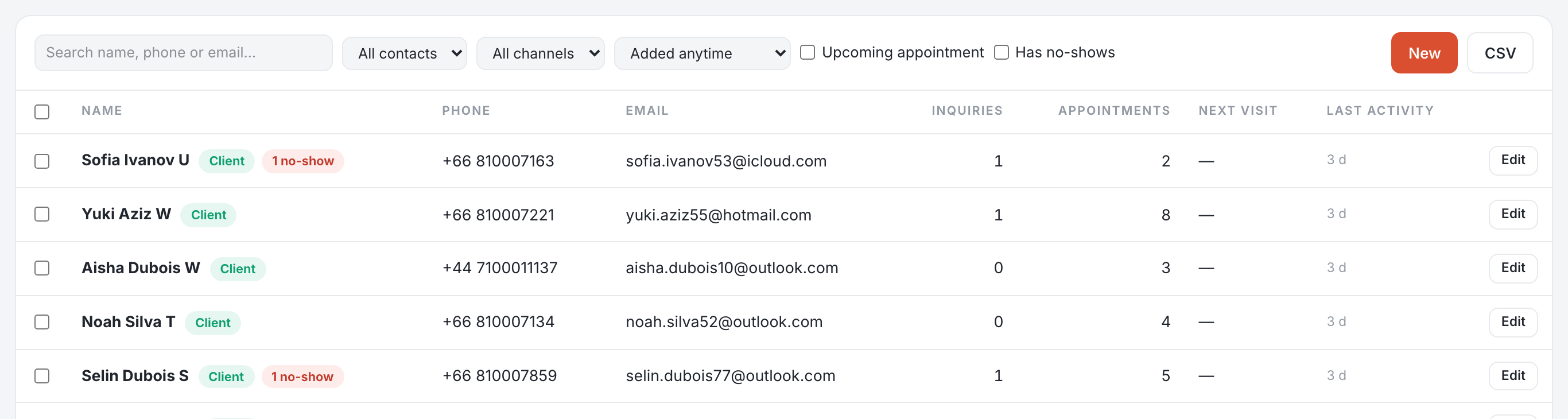
Name, phone, email, how many inquiries and appointments they have, their next visit and their last activity. Ten rows by default, with 25, 50 and 100 in the pager and the total beside it.
Narrowing it
- Search a name, a phone or an email.
- All contacts, leads only or clients only — someone becomes a client on their first kept visit.
- The channel they arrived on, and whether they were added in the last 7, 30 or 90 days.
- Two switches: has an upcoming appointment, or has no-shows.
Working on several at once
Ticking rows opens a bar above the list. Merge takes two or more and asks which one survives — the same person written twice, once from LINE and once from a web form, becomes one file with both histories. Delete removes them. Both say what they are about to affect before they do it.
One person
Edit opens their file: identity, and tabs for their conversations, inquiries, appointments, packages and your own notes. It is also where a loyalty card is activated — see Loyalty card.
Import and export
CSV does both. Import brings a list in from your previous system; export takes contacts out, for a mailing tool or your accountant. Admins only, and only once there is something to export.
A practitioner sees the people they have seen or are due to see, not the whole base.