Reminders
The rules that write to a client before a visit, and after a missed one.
Reminders is a list of rules, not a list of messages. A rule says when to write and on which channel; Moshivo then applies it to every appointment on its own, for as long as the rule is on. Nothing here is sent by hand, and there is no queue to watch.
Reading this page is one of the six setup steps on your Cockpit checklist — opening it is what ticks it off, because the point of the step is that somebody has seen the cadence a workspace starts with.
What a rule is made of
Add opens the form. Three fields, in this order:
- The kind. Appointment reminder (before the appointment) writes ahead of a confirmed booking. No-show recovery (after missed visit) writes after one that was marked missed.
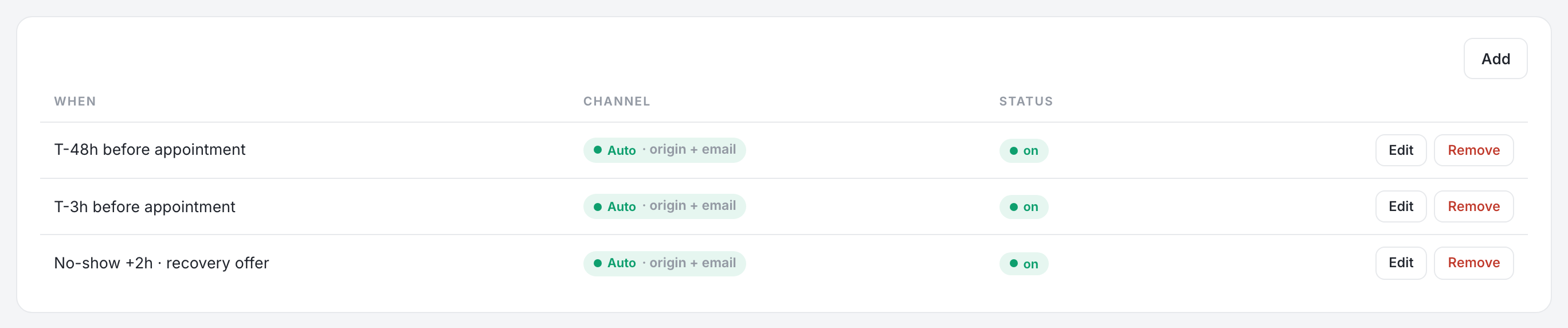
- The offset, in whole hours, from 1 to 336 — up to two weeks either side. Rules read as T-24h before appointment and No-show +2h · recovery offer in the list.
- The channel. Auto (origin + email) is the default, or a fixed one: LINE, WhatsApp, Email or SMS.
A third kind, Lead follow-up, appears in the list and can be saved, but nothing dispatches it today. Chasing a quiet enquiry is the assistant's job, configured on Agent.
Auto, and why it sends twice
Auto resolves to the channel the client first reached you on — the earliest conversation decides, LINE or WhatsApp — and adds email as a second copy whenever you hold an address. Two messages is deliberate: a reminder that arrives is worth more than a reminder that was tidy, and the two channels fail for different reasons.
A fixed channel sends on that channel and no other. The Fallback (optional) field beside it is recorded and shown on the rule, but nothing retries on it when a send fails, so a rule that names a channel a client cannot be reached on simply does not go out. SMS is in the list and is not wired yet; a rule set to it sends nothing. Auto is the safe answer to both.
Turning one on and off
The Status chip in the row is the switch: on or off, in one click, without opening anything. Clicking the row itself opens the rule for editing, and the row menu deletes it. Turning a rule off stops future messages; it does not recall what is already queued to send in the next few minutes.
What the client receives
The wording is Moshivo's and is not edited here. It is written in the client's own language — learned from what they wrote to you, falling back to your workspace language — and it carries a link to change or cancel, which is what turns a reminder into a rescheduled appointment rather than an empty chair. A video-call booking gets the meeting link instead of the address.
On WhatsApp the message is an approved template, because a reminder always lands outside Meta's 24-hour reply window. It only goes out in a language your number has approved, so a template still awaiting Meta falls back to English rather than failing. Connect the channel on Channels.
Timing, honestly
The dispatcher runs every five minutes, so a rule due at 09:00 goes out between 09:00 and 09:05. It works oldest-first and stops on a clock, which means a very busy minute delays the tail rather than losing it. A no-show older than seven days is never recovered: it is too late to be a recovery and too old to be welcome.
Reminders are on every plan. They start sending as soon as a messaging channel is connected — before that, a rule is a setting with nothing to reach.