Agent
The assistant that answers, books and follows up for you.
Agent is one object seen three ways: the box on your website, what it has been saying, and how it behaves. The tabs are Widget, Conversations and Settings, in that order — the settings are opened once, the transcripts are what you come back to. At the right of the tab row sits your conversation quota: one thread the assistant answers counts once, however many messages it takes, and it resets on the 1st.
Widget
The widget is a small avatar that opens into a guided chat: a visitor picks a service, a day, a time, leaves a name and a phone number, and the appointment lands in your agenda. It books with or without the AI behind it, which is why this tab is never locked.
Install it by copying the one-line snippet and pasting it anywhere on your site — it is a <script async> tag, so it works on any builder that accepts custom HTML and does not care where in the page it sits. Two optional attributes, data-label and data-color, match the button to your site. The same page is also a plain direct booking link, for an Instagram bio, a LINE rich menu, a Google Business profile or a QR code; campaign parameters on that link are carried into every inquiry.
Appearance is edited on the left and previewed on the right: displayed name and avatar, teaser message, button label, the chat opening question, the auto-reply sent when someone writes, the accent and header colours, and when it opens — immediately, after a few seconds, or only when clicked. Wording is held in every language you serve, with a default language, so a Thai visitor and a French one read the same widget in their own.
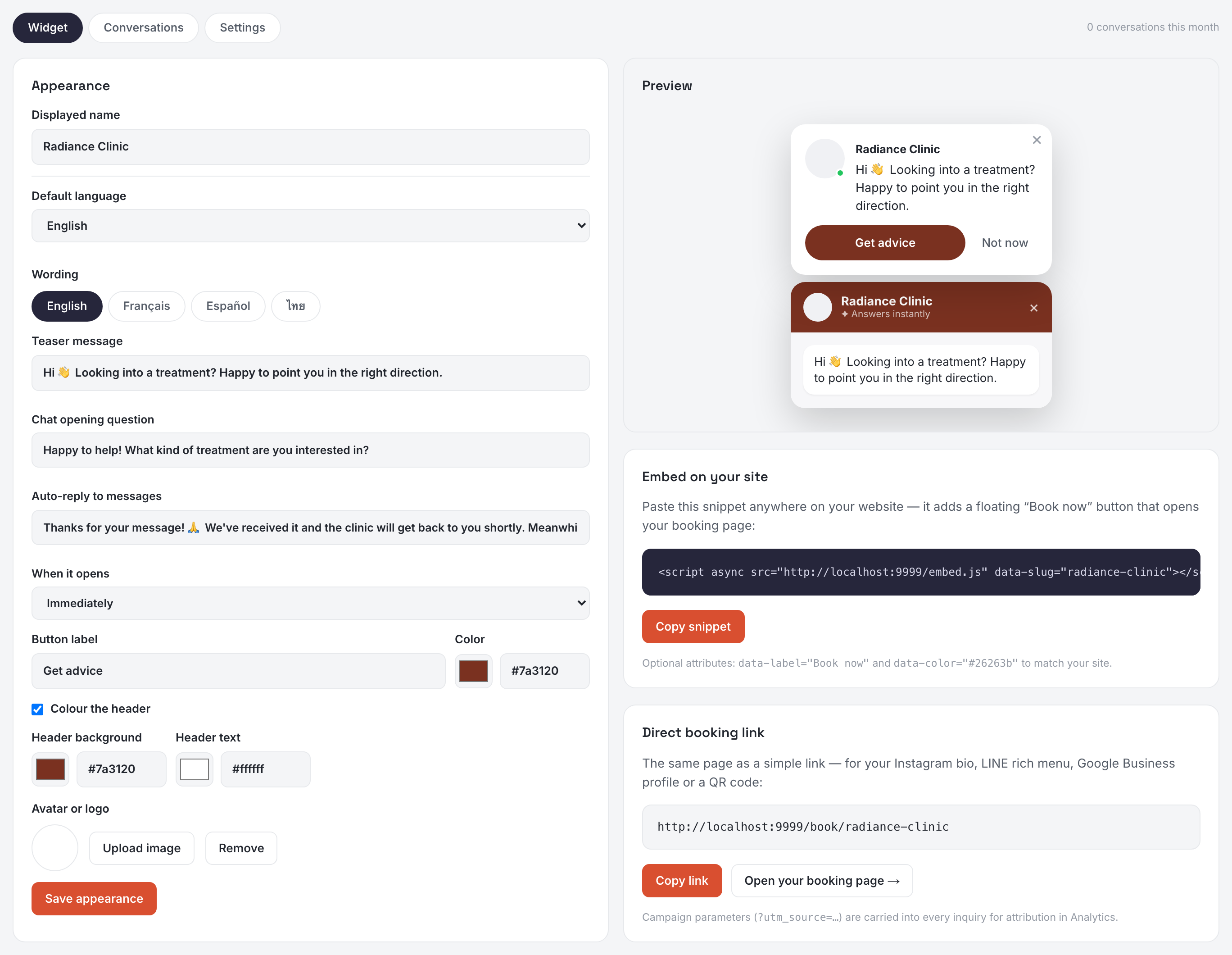
A teaser is shown once a day per visitor; dismissed, it collapses back to the avatar. The list of services leads with your five most booked over the last six months, with a search box above them, and re-ranks itself as your bookings change. There is nothing to configure there.
Settings — what the assistant does
A visitor is never trapped in the guided flow: a message box sits at the bottom of the widget throughout. When the assistant is on, what comes back is a real answer rather than an acknowledgement. It knows your services, your practitioners and your opening hours, reads your memory, and can do three things.
- Answer — within your rules. Nobody reviews what it says before the visitor reads it, which is why its instructions are the most cautious of all your surfaces.
- Book — through the same engine as the guided flow, so it can only offer slots that are genuinely free. An email address is required before it books: a phone number alone gives you no way to confirm or to reschedule.
- Hand over — when it cannot help, it gives the visitor a channel where a human can reach them. It does not pretend, and it does not leave someone stranded.
How it writes is the prompt at the top of this tab, with the same three moves as everywhere else — Teach an instruction, Edit and Lock the wording, Rebuild this to see it applied. The other three prompts live on Writing.
Auto-reply on messaging
The same assistant answers the messages people send you on LINE, WhatsApp, Messenger, Instagram and email — it checks real availability and can book exactly as on the site, so a first reply goes out when nobody is at the desk. The Auto-reply on messaging panel has one row per channel, the website included; a channel you have not connected is greyed out rather than hidden.
- Instantly — it replies within seconds. This is the website's only setting: there is nobody to wait for on a page.
- After 5, 10, 30 minutes or 1 hour — it waits, and replies only if nobody on your team has answered by then.
- When — always, only outside your opening hours, or only during them.
When it cannot help, or the person asks for a human, it hands the conversation over and stays quiet on that thread for 24 hours. The same happens the instant you reply from the Inbox — a human reply always wins.
A thread the assistant handled alone is marked read. One it handed over, or could not handle, stays unread, so the unread badge becomes your "needs a human" list.
Follow-ups
Someone asks a question, the assistant answers, and then nothing. They were interrupted, they meant to come back, they forgot. That is the cheapest inquiry a clinic loses. Follow-ups sit under auto-reply, because a follow-up only exists once a reply has been sent.
Add as many steps as you want. Each delay is counted from the assistant's reply — not from the client's message, and not from the previous step — in minutes or hours, whichever you think in. Two hours, then a day, then three days is a common series.
The final step is written differently, and it knows it: a middle follow-up can stay light because another is coming, while the last one closes the loop, makes saying no cost nothing, and never suggests it will write again. A message promising to check back that then never does is what makes a series feel automated.
Three things cancel every remaining step at once, not just the next:
- The client replies. They are back — there is nothing left to chase.
- Someone on your team answers in the Inbox. The assistant does not speak over a person, and that includes speaking after one.
- An appointment is booked, on any channel. The chase had one purpose and it happened.
WhatsApp, Messenger and Instagram close a service window 24 hours after the client's last message. Inside it the assistant writes freely. Outside it, WhatsApp accepts only a pre-approved template, charged per message by Meta — so any step further out than 24 hours carries an Include WhatsApp checkbox. Leave it off and the step still goes out on LINE and by email, and is simply skipped on WhatsApp. Messenger and Instagram have no such template, so a closed window ends the series there whatever you choose.
Conversations
Every conversation the assistant had, on the website and on your messaging channels alike, newest first, with how each one ended: Booked, Handed off, Answered, Open, Cut short or Failed. Read it as a transcript of your front door. The two used to be listed apart, which showed you the widget alone while the meter above it counted both.
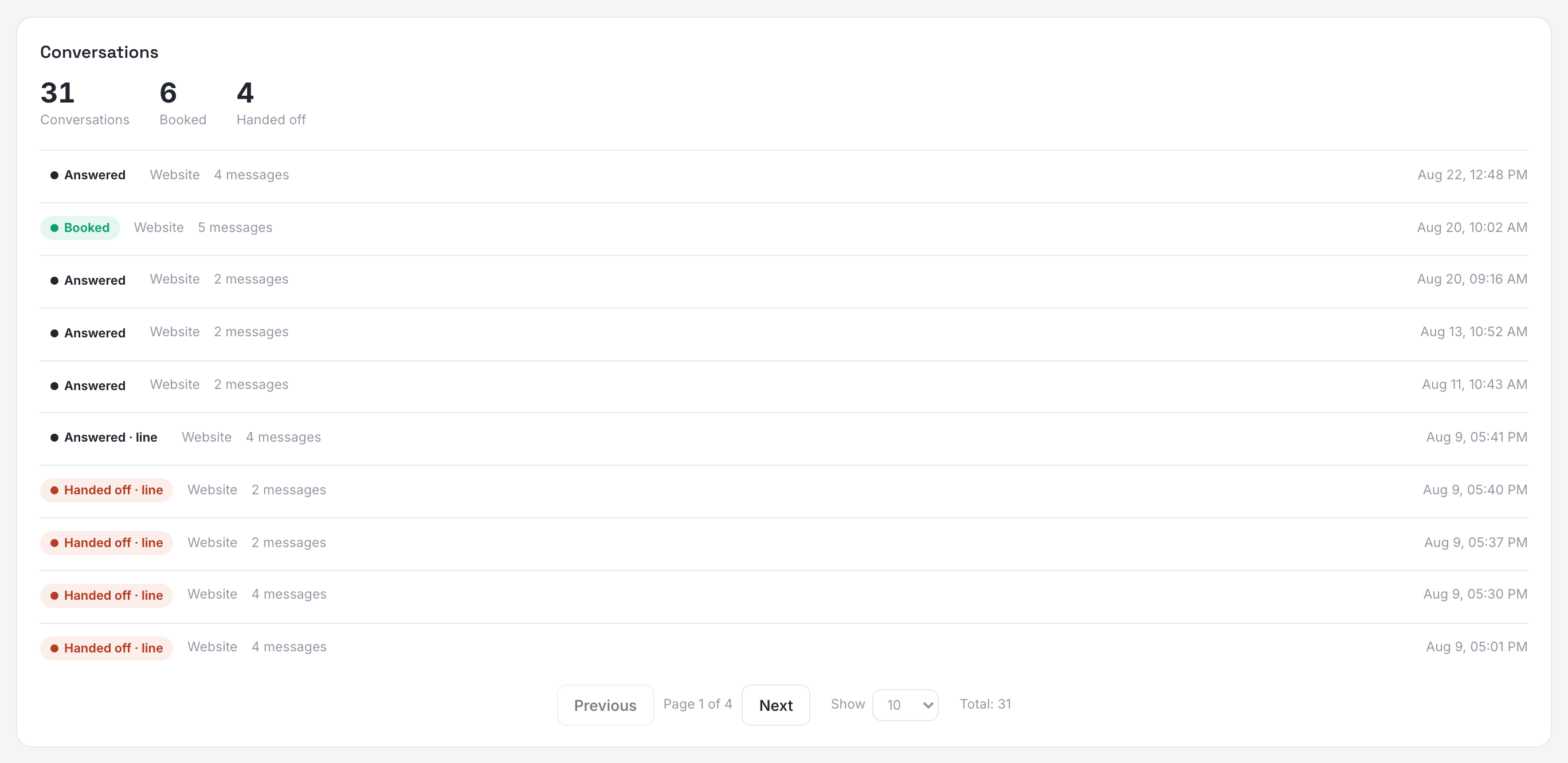
Messaging threads also live in your Inbox — real people on real channels you can keep talking to. Website chats do not: an anonymous visitor has no address to push a reply to, and that is exactly what the hand-over is for.
When the monthly conversation quota is used up the assistant stops taking new threads and hands them to your team until the 1st. Follow-ups are not counted against it. What the team asks the assistant to write is a separate allowance, on Writing.